Give the AI a clean way to hand you an importable Perspective page.
This skill is for the offline scenario: the agent cannot touch the Gateway, so it should deliver a portable package that targets Ignition project-resource shape, plus install notes and validation steps.
Why it was made
- Stops the model from handing over loose JSON that does not match Ignition resource layout.
- Keeps customer paths, credentials, tokens, and host details out of reusable instructions.
- Keeps Gateway-level tags, database connections, users, security, and providers outside the package claim.
- Makes the handoff reviewable: package, dependencies, install notes, and validation checklist.
Common use cases
- Prototype a Perspective dashboard for a customer who will import it later.
- Package reusable views, routes, and page config for a development Gateway.
- Create a starter faceplate or process overview without granting host access.
- Send an integrator a concrete artifact instead of a prompt transcript.
Proof style
Validate the artifact, not the promise.
The skill pushes the AI to validate package shape offline and state what still needs to be proven inside Designer after import.
Evidence
Example package evidence
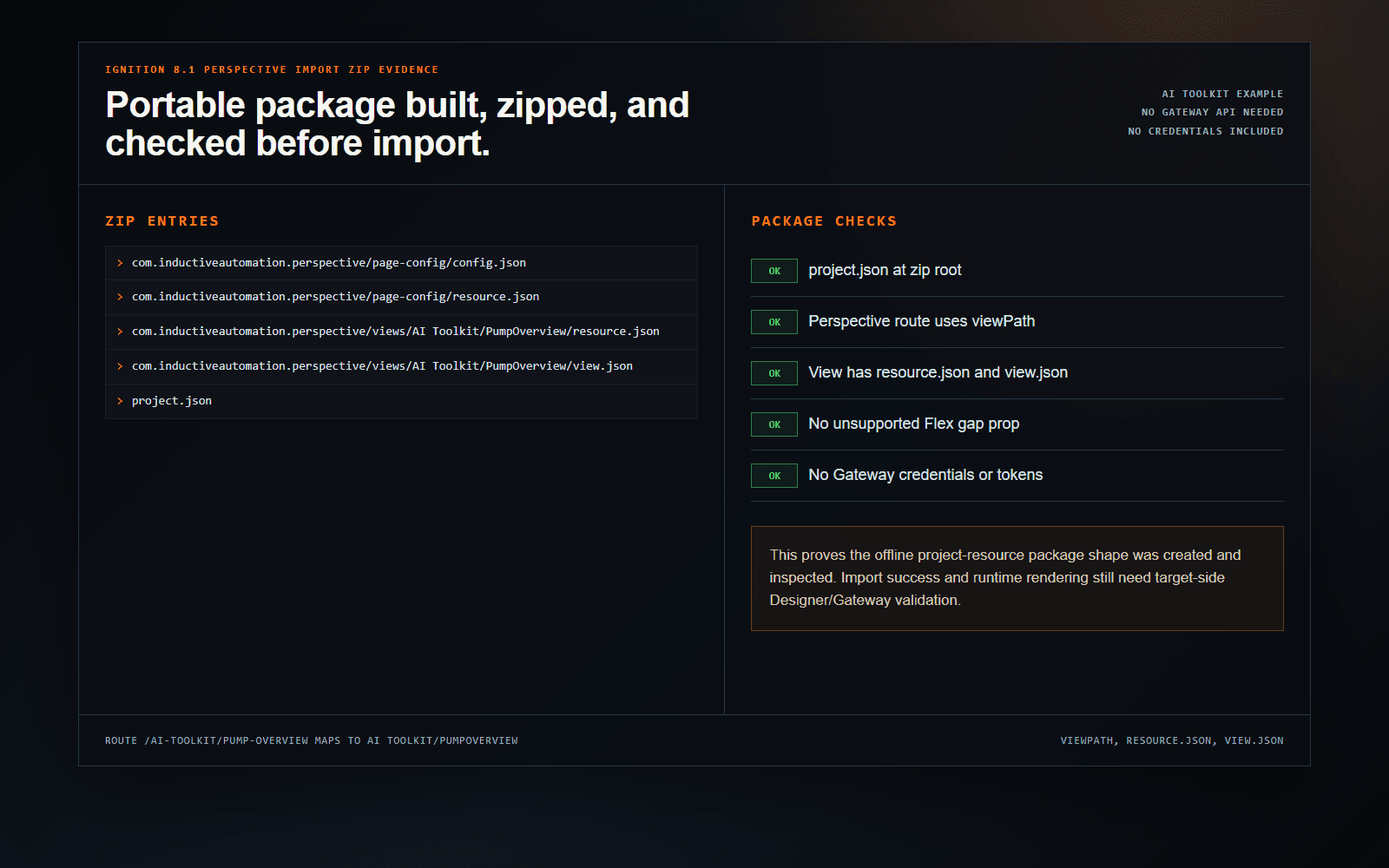
This example proves the offline project-resource package shape was created and inspected. Import success and runtime rendering still need target-side Designer or Gateway validation.
- project.json is at the zip root.
- Perspective page configuration uses viewPath for the route.
- The view folder includes resource.json and view.json.
- The generated view avoids the unsupported Flex gap prop.
- No tag providers, Gateway URLs, credentials, or tokens are included.
Example prompt
Create a portable Ignition 8.1 Perspective import zip for a pump overview route with reusable faceplate views.

Build a reusable pump faceplate and route for:
- Route: /enterprise/acme/site/austin/area/utilities/line-1/pumps/pump-102
- Display name: Pump 102
- Equipment folder: [Sample_Tags]Enterprise/ACME/Austin/Utilities/Line1/Pumps/PUMP-102

Use these tag paths as example bindings:
- Running: [Sample_Tags]Enterprise/ACME/Austin/Utilities/Line1/Pumps/PUMP-102/Running
- RPM: [Sample_Tags]Enterprise/ACME/Austin/Utilities/Line1/Pumps/PUMP-102/RPM
- Torque: [Sample_Tags]Enterprise/ACME/Austin/Utilities/Line1/Pumps/PUMP-102/Torque
- Amps: [Sample_Tags]Enterprise/ACME/Austin/Utilities/Line1/Pumps/PUMP-102/Amps
- Faulted: [Sample_Tags]Enterprise/ACME/Austin/Utilities/Line1/Pumps/PUMP-102/Faulted

Do not hardcode the equipment path inside reusable child views. Use view parameters such as equipmentPath and displayName so the customer can reuse the package for another pump after import.
This is the kind of focused instruction the skill is designed to make useful. The value is in the checks and Ignition-specific defaults the AI uses after reading the skill.
Expected output
- Creates an import package that targets trusted project-resource structure.
- Preserves page config, resource metadata, view paths, and dependencies.
- Uses equipmentPath-style parameters for reusable pump views instead of one-off hardcoded bindings.
- Includes install notes, validation steps, and placeholders the customer must fill in.
Related workflows
Skills that pair with this one
Lifetime membership
Want access to this skill?
The one-time membership unlocks this skill, the full Ignition AI Toolkit, the Web Dev runner materials, setup docs, and versioned Ignition 8.1 and 8.3 downloads.
No subscription. Lifetime members keep portal access to the current toolkit and future skill releases, including planned Ignition 8.3-focused skills as they are added.