Loop Engineering Cut Our Transcription Time by 11.2x
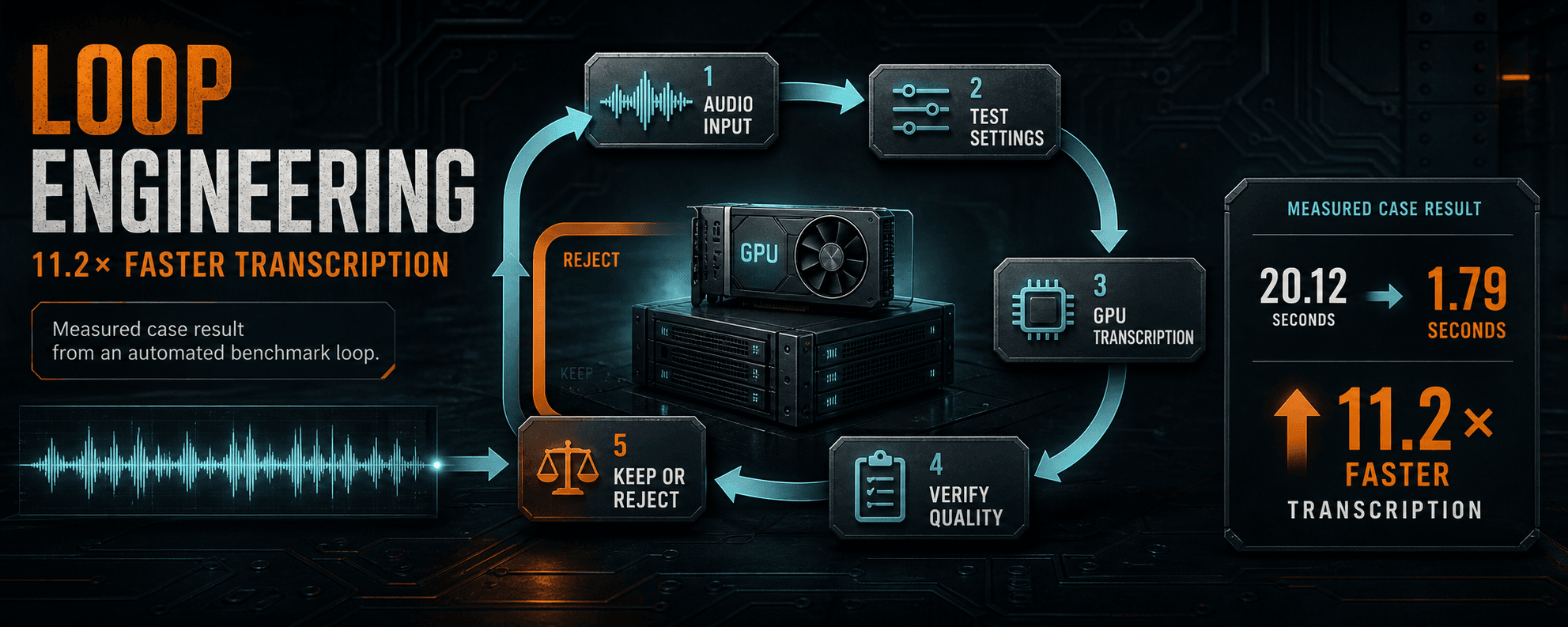
We changed one variable at a time, rejected faster settings that lost transcript content, and promoted only the configuration that passed the quality floor.
Key takeaways
- Measure a stable baseline before asking an agent to optimize.
- Change one parameter at a time and record both speed and quality.
- Reject faster settings that fall below the quality floor.
- Treat 11.2x as an observed case result, not a universal Whisper claim.
The pipeline was already useful, but too slow
The desktop workflow downloads a private video, extracts the audio, sends it to a GPU-backed transcription service, and returns plain text plus an SRT subtitle file.
The service ran openai/whisper-large-v3 on Google Cloud Run with one NVIDIA L4 GPU, 4 vCPU, 16 GiB of memory, concurrency 1, maximum instances 1, and minimum instances 0.
The optimization target was cloud processing time per 60 seconds of audio. GPU time, transcript length, quality retention, and valid SRT output remained acceptance checks.
Start with a configuration you can reproduce
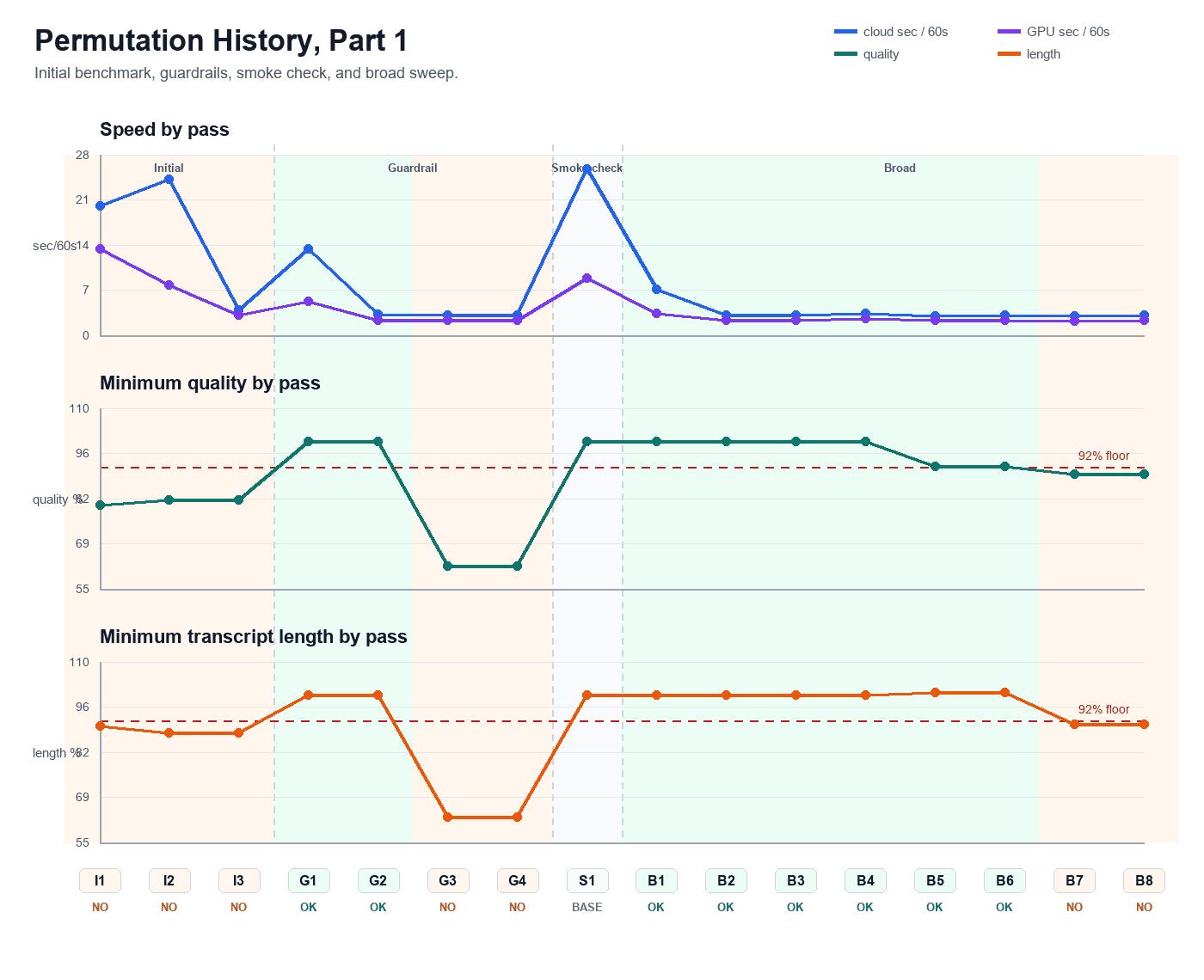
The baseline used batch size 1, beam size 2, 15-second chunks, and word timestamps disabled. It needed 20.12 cloud seconds and 13.44 GPU seconds for each audio minute.
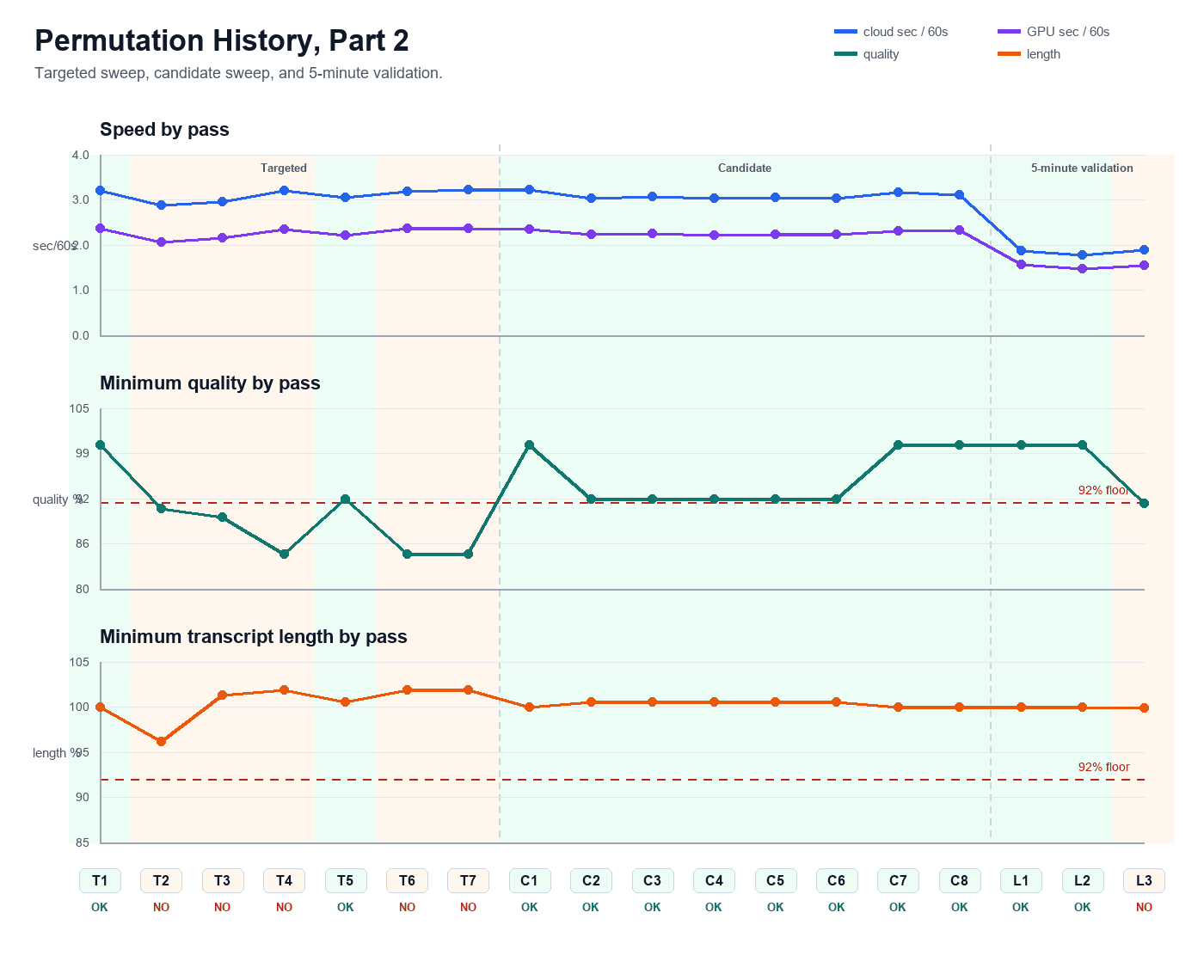
A 60-second control clip made the sweep fast enough to repeat. A longer five-minute sample was reserved for confirmation after a candidate passed the short test.
The agent earned each change with evidence
The acceptance floor was 92 percent quality and transcript length relative to the baseline. One tempting batch-size and chunk-length combination reached 91.9 percent quality, so it was rejected even though it was fast.
- 01Run the baseline and store the transcript, SRT, timing, and settings.
- 02Change one parameter such as batch size or chunk length.
- 03Run the same control audio.
- 04Compare cloud time, GPU time, transcript length, quality retention, and SRT validity.
- 05Reject the candidate if it falls below the quality floor.
- 06Promote a winner only after the longer validation sample also passes.
The promoted configuration cut cloud time from 20.12 to 1.79 seconds
The accepted configuration used batch size 14 and 30-second chunks. It recorded 1.79 cloud seconds and 1.48 GPU seconds per audio minute, with 100 percent transcript-length and quality retention against the measured baseline.
That is a 20.12 / 1.79 = 11.24x cloud-time speedup, reported as 11.2x, and a 91.1 percent reduction in cloud processing time. GPU time improved by 13.44 / 1.48 = 9.08x, reported as 9.1x.
These figures describe this environment, model, audio, and measurement method. Different languages, speakers, noise, hardware, service settings, or evaluation rules can produce different results.
This is where an agent becomes more than a code generator
The useful part was the closed loop: change, run, measure, compare, reject or promote, and record the evidence. The agent could explore more candidates than I would have tested manually without relaxing the acceptance criteria.
The same pattern applies to image processing, report generation, database queries, API calls, and industrial analytics. Give the agent a bounded target, a repeatable test, a quality floor, and permission to learn only from measured results.
What to record before claiming a speedup
- Exact model and revision
- Hardware, CPU, memory, and service limits
- Audio duration, language, speakers, and noise conditions
- Baseline and candidate settings
- Wall-clock, cloud, and GPU timing definitions
- Transcript-quality comparison method
- Subtitle validity and any post-processing
- Short-control and longer-confirmation results
Article FAQ
Frequently asked questions
Does Whisper always run 11.2x faster with batch size 14?
No. The 11.2x result belongs to this measured Cloud Run environment, model, audio, and evaluation method. Other workloads need their own baseline and sweep.
Why measure transcript length as well as speed?
A faster run can silently omit content. Transcript length is not a complete quality metric, but it is a useful guardrail alongside content comparison and valid subtitle output.
Why use both a short and a long audio sample?
The short control keeps the parameter sweep inexpensive and repeatable. The longer sample checks that the winning setting still behaves well beyond the small benchmark.
What is loop engineering?
It is an iterative workflow where an agent changes a bounded variable, runs a repeatable test, measures the result, and promotes only changes that satisfy explicit acceptance criteria.
Sources and notes
Documentation referenced
Lifetime membership
Want the toolkit behind this workflow?
The one-time Ignition AI Toolkit membership includes the Web Dev API runner, skill files, setup docs, versioned downloads, and released Ignition 8.3 resources for lifetime members. Founder pricing is available while the first 50 spots last.
Founder lifetime access - $99