I Built Three Working Ignition Perspective Screens With an AI Agent in About an Hour
The agent created real Perspective resources, then used the live session, screenshots, geometry checks, and Gateway logs to find and fix problems. The first pass still needed engineering review.
Key takeaways
- The outputs were real Perspective pages with tags, bindings, Jython, charts, animations, routes, and navigation.
- The agent used API actions where possible, then checked the live UX in a browser and reviewed Gateway logs.
- Screenshots and geometry checks exposed layout problems that resource validation alone did not catch.
- The first pass was functional but not visually complete; short human feedback drove the final fixes.
Three working screens, not mockups
In one working session, I asked an AI agent to build three Ignition Perspective screens. About an hour later, the project had real pages running in a browser. I did not drag components, edit bindings, write the Jython, or type resource JSON by hand.
The screens used live and historical tags, bindings, Jython, charts, animations, routes, and navigation. I reviewed the results and gave short voice feedback when the UX needed another pass.
The timing is a field note from this session. It is not a controlled productivity benchmark, and it should not be generalized to every project.
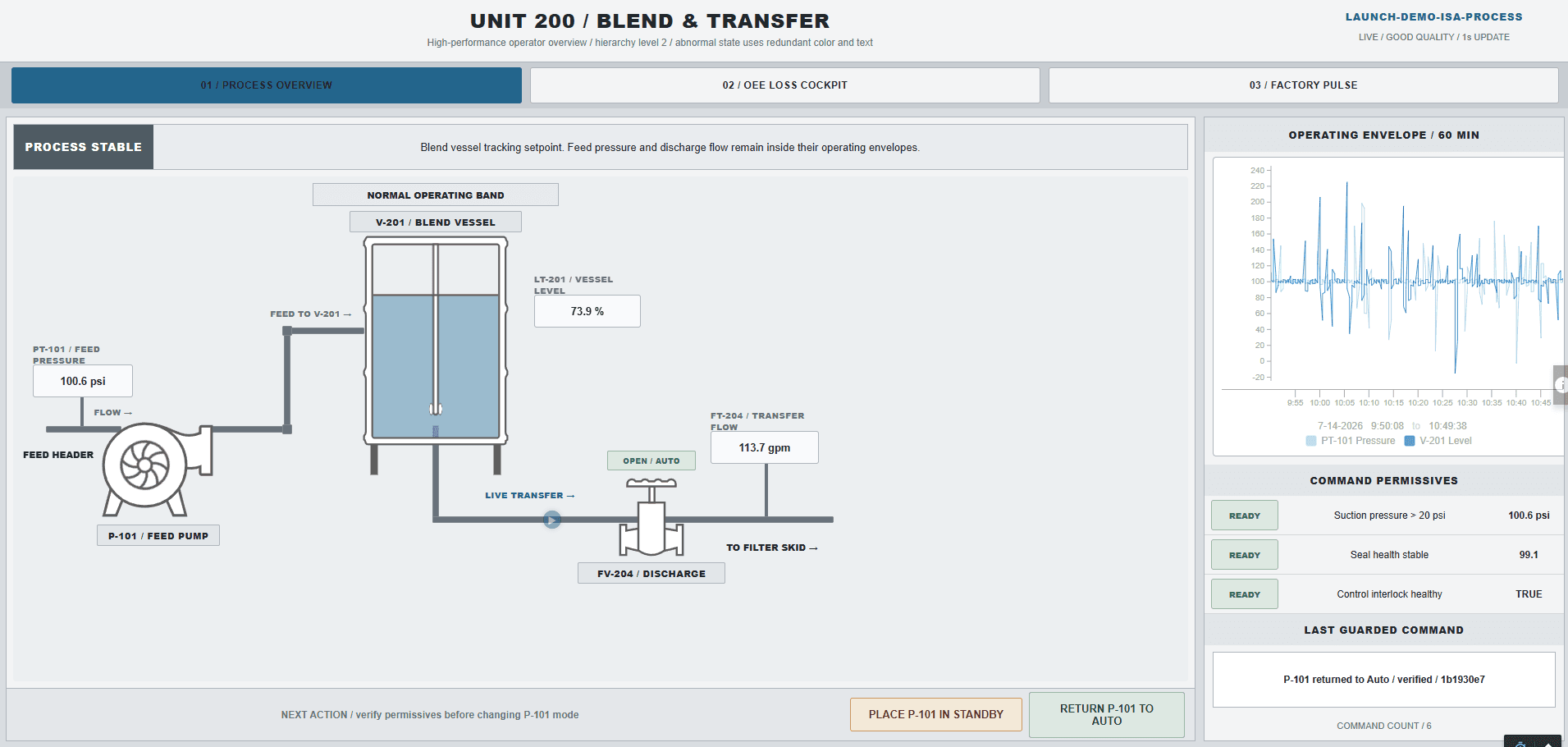
Unit 200 blender overview
The first page combined a feed pump, process vessel, valve, live values, history, permissives, and operator commands into one equipment view.
The first visual pass exposed a pipe alignment problem and a confusing animation marker. The browser screenshot made both defects obvious, and the agent revised the resource and checked it again.
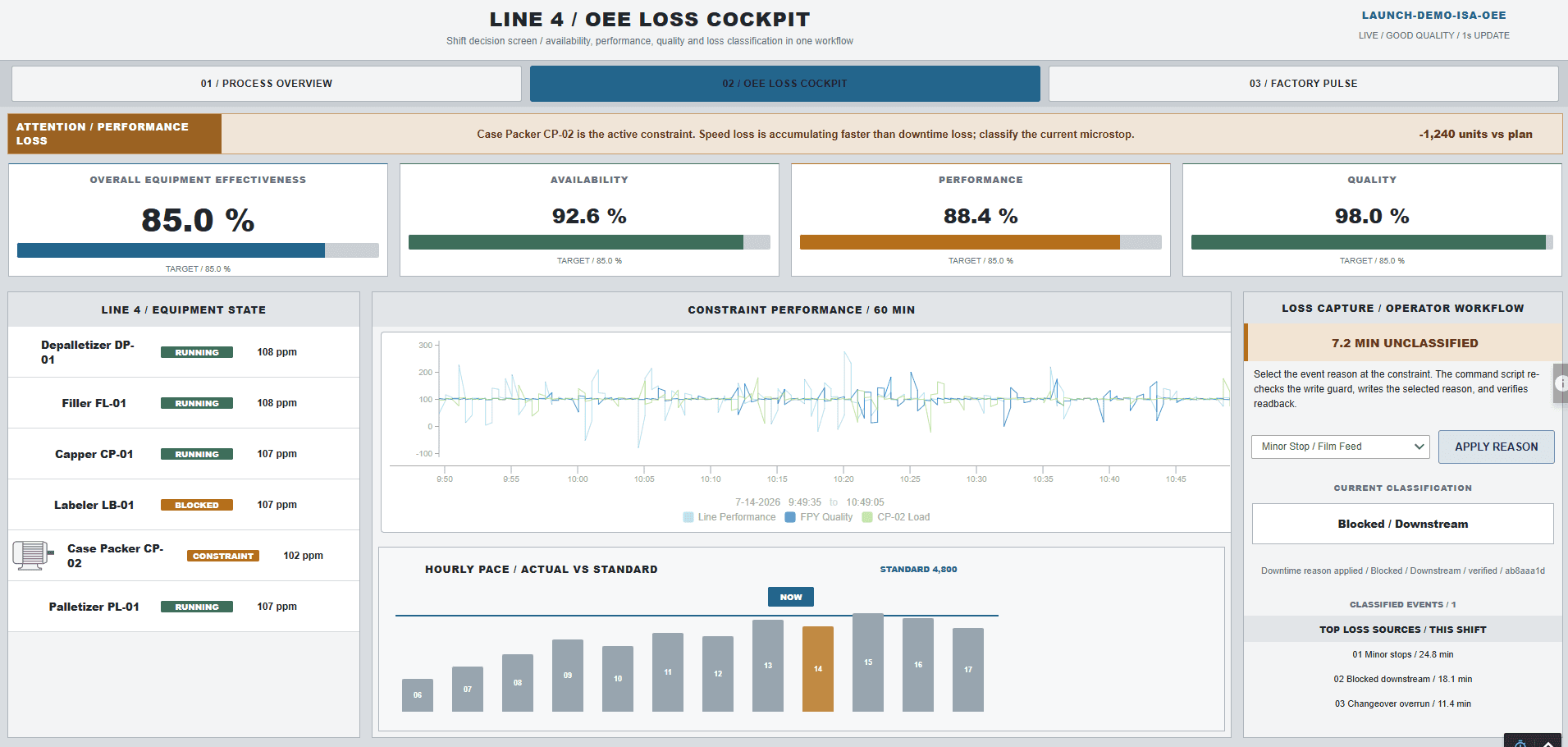
OEE cockpit
The OEE screen brought availability, performance, quality, machine states, hourly actual versus standard, a trend, downtime, and a Pareto view into one page.
A number-centering problem survived the first resource build. Geometry and screenshot review caught it before the screen was treated as complete.
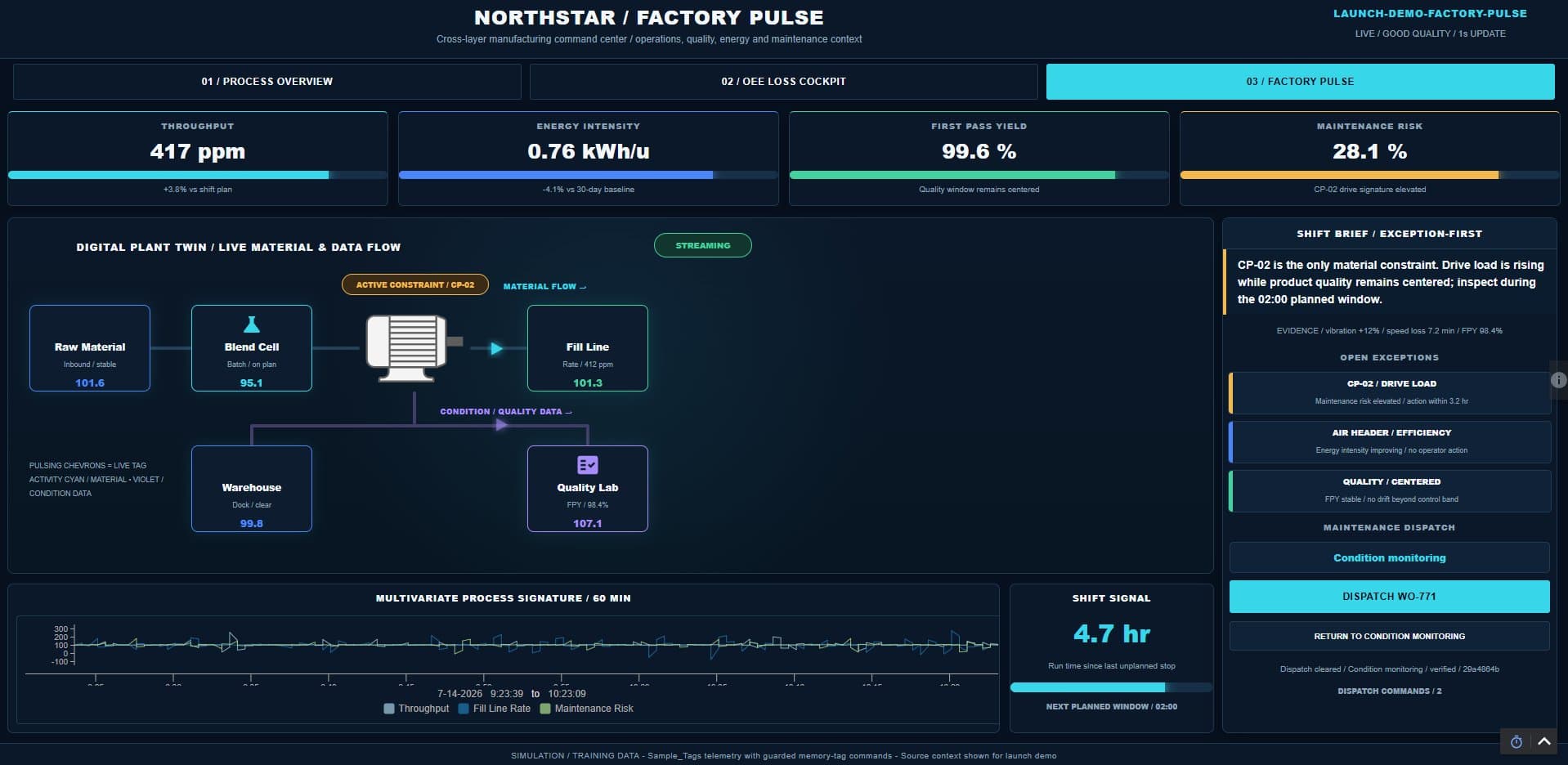
Factory Pulse dashboard
The third page summarized operations, quality, energy, and maintenance with charts, animated bars, and live motion.
It demonstrated the same pattern at a broader level: build the supported resources, launch the live route, inspect what an operator sees, and revise the parts that are unclear.
The agent had Ignition-specific context and a way to act
A general coding model does not know a project's Perspective JSON, tag paths, route conventions, Jython constraints, or HMI standards. The agent used skills for Perspective resources, Jython, and HMI/SCADA design instead of improvising those rules.
Gateway tools let it browse tags, inspect current resources, apply supported changes, create routes, read resources back, and review logs. API actions handled the repeatable Gateway work. The browser handled the runtime UX that an API response cannot show.
Build, open, inspect, revise, and prove
- 01Inspect the target project, routes, tags, and existing resource patterns.
- 02Build a bounded Perspective change and apply it through supported API actions.
- 03Read the saved resources back from the Gateway.
- 04Open the live route in a headless browser.
- 05Click through the workflow and capture useful screenshots.
- 06Check geometry, label positions, spacing, clearances, and responsive behavior.
- 07Review browser console messages and a bounded Gateway log window.
- 08Revise the resource, redeploy it, and run the checks again.
The prompt I use
Use the Ignition 8.3 Perspective Builder skill to build [describe the screen] in [project and path] on this Gateway. Use the authenticated OpenAPI endpoints first and llmImport when needed. Read back every saved resource, then use a headless browser to test the live UX, click through the workflow, and capture screenshots where useful. Verify the screen's geometry, label positioning, spacing, and clearances so nothing overlaps or becomes difficult to read. Review the Gateway logs for errors or warnings, and clearly label anything you could not verify.A working screen still needs an engineer
The agent can create the page faster, but the engineer decides whether it is right for the operator. Alarm philosophy, navigation, control boundaries, decision hierarchy, process meaning, and acceptance criteria come from the plant.
The useful division of work is straightforward: give the agent the approved context and verification tools, then review the result as engineering work. If a test could not be run, keep that limitation visible.
Article FAQ
Frequently asked questions
Can an AI agent build real Ignition Perspective pages?
Yes, when it has version-matched resource guidance and supported Gateway tools. The result still needs readback, browser testing, log review, and engineering acceptance.
Why use a browser after the API work is complete?
The browser reveals runtime layout, navigation, console errors, interactions, responsive behavior, label clearance, and overlap problems that a saved-resource response cannot prove.
Did every Perspective project take about an hour?
No. About an hour describes this single reported session and these three screens. Complexity, existing project patterns, data readiness, testing scope, and visual standards can change the time substantially.
Should an AI agent change a production Gateway without review?
Production work needs an approved scope, change control, backups, bounded permissions, and human acceptance. Automation does not remove engineering ownership.
Sources and notes
Documentation referenced
Lifetime membership
Want the toolkit behind this workflow?
The one-time Ignition AI Toolkit membership includes the Web Dev API runner, skill files, setup docs, versioned downloads, and released Ignition 8.3 resources for lifetime members. Founder pricing is available while the first 50 spots last.
Founder lifetime access - $99