Use the Ignition 8.3 OpenAPI as a Map for Your 8.1 API
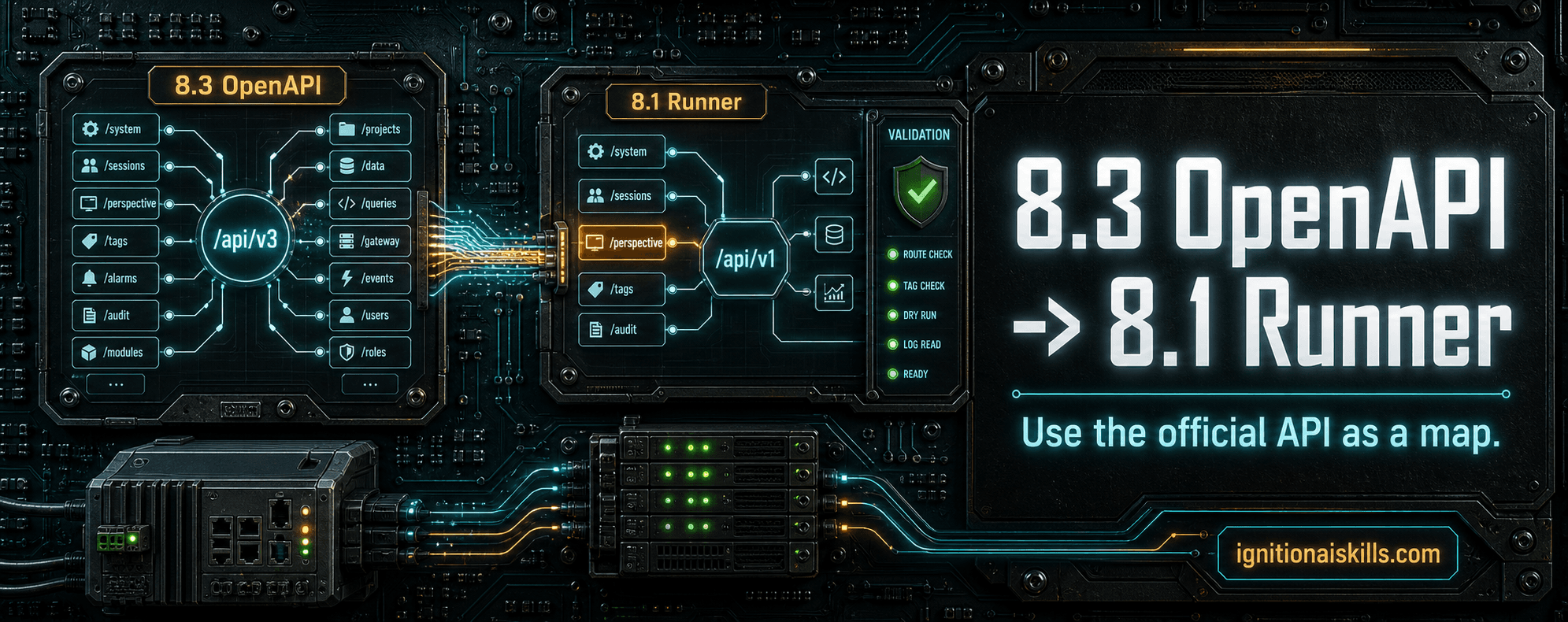
A concise way to mine the official Ignition 8.3 OpenAPI for ideas when you are building your own Ignition 8.1 Web Dev API runner: compare capabilities, pick one useful gap, build it narrowly, then make an AI agent test the edge cases.
Key takeaways
- Use the Ignition 8.3 OpenAPI as inspiration for API coverage, not as proof that an 8.1 custom runner should expose everything.
- The native 8.3 Perspective endpoints are strongest around live sessions, pages, active views, and platform Perspective resources.
- A custom 8.1 Web Dev runner can be stronger for project-level page authoring, route/view validation, dry-runs, backups, rollback, and AI seed extraction.
- Pick one useful 8.3 pattern, translate it into one narrow 8.1 runner action, and test it before expanding the API.
- An AI agent should build tests around the feature, compare behavior against docs, try edge cases, and update the skill only with proven lessons.
Use 8.3 as a reference map, not a script to copy
Ignition 8.1 does not give you the same official HTTP API surface that newer Ignition versions expose. That does not mean you have to invent your custom 8.1 Web Dev API from a blank page.
A practical approach is to look at the Ignition 8.3 OpenAPI and ask: what did Inductive Automation decide was worth exposing over HTTP? Which parts would help an AI agent inspect, validate, or troubleshoot an 8.1 Gateway?
This is not about saying the custom 8.1 runner is better than the official 8.3 API, or the other way around. They solve different jobs. The useful move is to let the 8.3 API give you feature ideas, then build only the narrow 8.1 runner actions your workflow actually needs.
What I compared in my own runner
For my Ignition AI Toolkit runner, I compared the implemented 8.1 Web Dev runner actions against the 8.3.7 OpenAPI surface. The 8.1 runner is a custom POST endpoint that dispatches JSON actions such as routesList, viewsList, viewRead, pageValidate, dryRun, apply, tagBrowse, namedQueryPreview, logQuery, backupList, and rollback.
The 8.3 API is different. It is a native REST/OpenAPI surface with many typed endpoints. The Perspective portion is especially useful for live runtime questions: which sessions are active, which pages are open in a session, and which views are active on a page.
The comparison immediately gives you a roadmap: keep the 8.1 runner focused on authoring and validation, then borrow selected 8.3 runtime/config ideas when they would make the AI workflow safer or easier to debug.
A cleaner side-by-side comparison
This comparison is the point. The official 8.3 API gives you ideas for runtime and configuration visibility. The custom 8.1 runner gives the AI agent a controlled page-building loop.
Once you see the difference, you can decide what to add next instead of making the runner huge on day one.
Live Perspective runtime
- Ignition 8.3 OpenAPI: native session list/detail endpoints, plus live session pages and active page views.
- Custom 8.1 runner: perspectiveSessionsQuery today; dedicated page/view runtime actions are good future additions.
Project routes and views
- Ignition 8.3 OpenAPI: not the main job of the Perspective session API.
- Custom 8.1 runner: routesList, viewsList, and viewRead inspect project resources before the agent builds.
Page authoring and validation
- Ignition 8.3 OpenAPI: platform-level APIs, not a targeted AI page build loop.
- Custom 8.1 runner: dryRun, apply, and pageValidate make generated work easier to review.
Perspective branding, themes, fonts, and icons
- Ignition 8.3 OpenAPI: native endpoints exist for Perspective branding, themes, fonts, icons, and related data files.
- Custom 8.1 runner: styleResourcesList can discover project styles, themes, images, and reusable views, but it does not manage those platform resources yet.
AI component seeds and recovery
- Ignition 8.3 OpenAPI: no dedicated AI seed extraction helper.
- Custom 8.1 runner: seedViewsList, seedViewRead, componentSeedRead, backups, rollback, hash checks, scan/validate.
Useful 8.3 ideas to borrow for an 8.1 runner
The most obvious features to borrow are not flashy. They are inspection and control actions that help the AI agent understand what is really happening in the Gateway.
- List pages inside a live Perspective session.
- List active views on a specific Perspective page.
- Terminate a test Perspective session with an optional message.
- Discover Perspective theme, font, icon, and branding resources.
- Expose read-only details about selected Perspective platform resources.
- Add safer resource find/list helpers before considering any create/update/delete workflow.
Do not expose everything just because 8.3 has it
A custom AI runner should not become a wide-open remote-control surface. The 8.3 API can show you possible capability areas, but your 8.1 runner still needs a tighter contract.
Start read-only. Cap result sizes. Require allowed prefixes. Require dry-run before writes. Require exact confirmation strings for mutation actions. Keep deletes out of the default workflow unless the user explicitly asks for them.
The question is not, 'Can I make this endpoint exist?' The question is, 'Would this endpoint make the agent easier to supervise?'
Turn one 8.3 endpoint idea into one tested 8.1 feature
This is where AI agents get useful. Do not just ask the agent to add an endpoint. Ask it to build the feature, write tests, hit the runner, inspect errors, compare the result to the docs, and think through edge cases that would waste time later.
- 01Pick one useful 8.3 endpoint pattern, such as pages in a live Perspective session.
- 02Write the narrow 8.1 runner action name, input fields, output fields, caps, and error cases.
- 03Add a test before implementation so the AI agent knows what success looks like.
- 04Implement the smallest Web Dev runner action that answers the question.
- 05Test the happy path, missing parameters, invalid identifiers, empty results, permission failures, and large result caps.
- 06Compare the behavior against official documentation and the 8.3 OpenAPI intent.
- 07Update the runner docs, public API reference, and skill guidance only after the behavior is proven.
Download the endpoint inventory
I used AI to analyze the Ignition 8.3.7 OpenAPI export and turn the endpoint surface into a workbook. The workbook includes a summary, all endpoints, Perspective page-related endpoints, all Perspective endpoints, tag summaries, resource types, and source metadata.
The inventory found 863 total operations and 51 Perspective-related operations in the 8.3.7 export. You can use it as a shortcut when brainstorming your own 8.1 runner features.
The goal is not to copy all 863 endpoints. The goal is to scan the patterns, choose one useful API idea, and build a focused 8.1 action that your AI agent can test.
- Look for read-only discovery endpoints first.
- Prefer bounded inspection before mutation.
- Translate official API ideas into smaller 8.1 runner actions.
- Make every new action prove itself with tests and evidence.
Where the Ignition AI Toolkit fits
If you want to build your own runner from scratch, the 8.3 OpenAPI is a strong source of ideas. If you want a tested starting point, the Ignition AI Toolkit includes the Web Dev API runner workflow I use for Perspective pages, tags, UDTs, scripts, SQL, logs, backups, rollback, and validation.
I still plan to borrow selected 8.3-style ideas into the runner over time, especially live Perspective page/view inspection and Perspective configuration discovery. That is the advantage of treating the runner as a living API: every useful test can become a better agent workflow.
Article FAQ
Frequently asked questions
Can I use the Ignition 8.3 OpenAPI to design an 8.1 API?
Yes. Use it as inspiration for capability areas and endpoint patterns, then implement only the narrow Web Dev runner actions that make sense for your Ignition 8.1 development or staging workflow.
Does the native 8.3 Perspective API replace a custom 8.1 runner?
No. They solve different problems. The 8.3 Perspective API is strong for live sessions, pages, active views, and platform Perspective resources. A custom 8.1 runner can be tailored for page authoring, dry-runs, validation, backups, rollback, and AI component seed workflows.
What should I add first to a custom Ignition 8.1 API runner?
Start with read-only discovery and validation. Health, routes, views, tag providers, tag browse, tag read, log query, dry-run, apply with confirmation, page validation, backups, and rollback are more useful than a broad mutation API.
Should my AI agent be allowed to delete resources?
No deletion should be part of the default workflow. Keep delete actions out of the runner unless the user explicitly asks for them, and still require strong confirmation, backups, and validation.
What is included in the endpoint inventory download?
The workbook includes the Ignition 8.3.7 OpenAPI summary, all endpoint operations, Perspective page-related endpoints, all Perspective-related operations, tag summaries, resource type summaries, and source metadata.
Sources and notes
Documentation referenced
Lifetime membership
Want the toolkit behind this workflow?
The one-time Ignition AI Toolkit membership includes the Web Dev API runner, skill files, setup docs, versioned downloads, and released Ignition 8.3 resources for lifetime members. Founder pricing is available while the first 50 spots last.
Founder lifetime access - $99